Human Mosh • AI Stem Splitter for Rock, Metal, Punk, Grunge & Metalcore
Split any song into clean stems — fast, DAW-ready, and built for heavy music.
Human Mosh AI Stem Splitter separates your track into Vocals, Drums, Bass, and “Other” (and more with 6-stem mode). Use it for remixing, practice, covers, mixing, sample flips, drum replacement, karaoke edits, or pulling isolated parts for content.
4-Stem + 6-Stem options
Best for: distorted guitars • live drums • stacked vocals
Exports: individual stem files (ready to import)
Metal-safe separation
Heavy mixes are brutal: distortion, cymbal wash, bass grind, parallel compression. This page targets those realities—so users trust you faster.
Choose your stem depth
Use 4 stems for speed and broad separation. Use 6 stems when you need more instrument detail for edits, remixes, and practice.
Clear expectations
Source separation isn’t magic. Dense mixes vary—so we explain what improves results (and what doesn’t) instead of pretending everything is perfect.
AI STEM SPLITTER PREVIEW
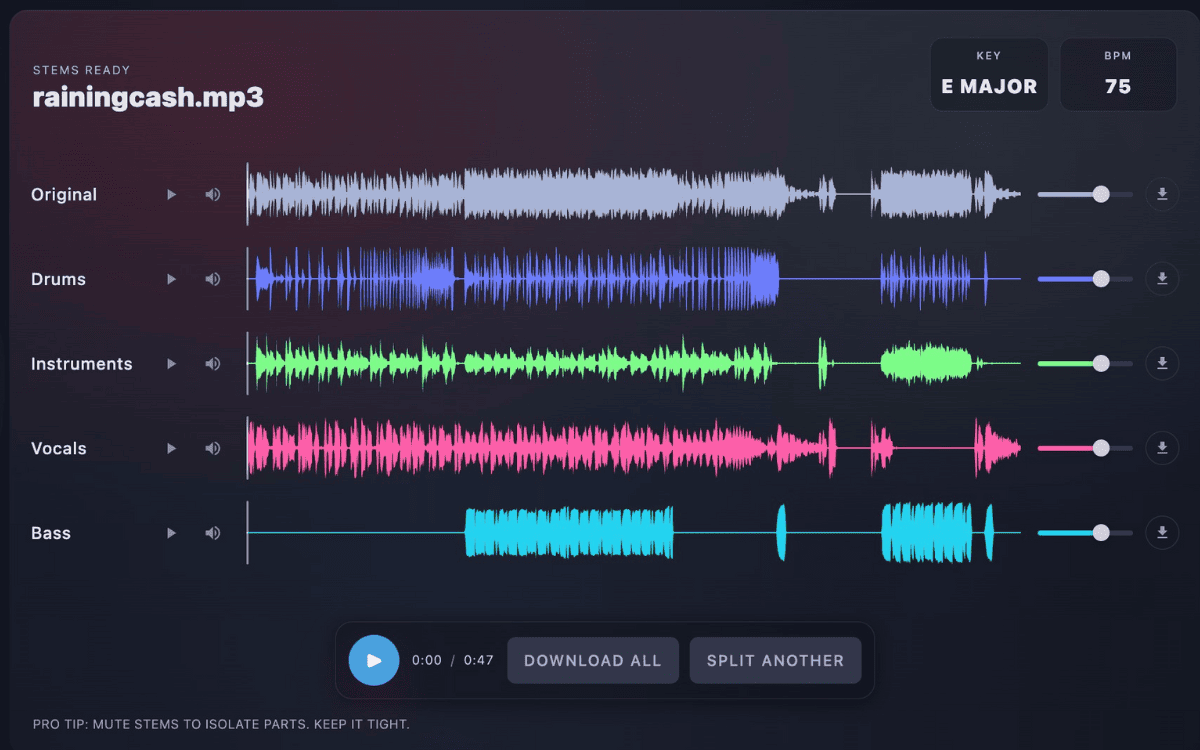
Tip: This single image improves conversion because users instantly “see” the output they’re buying.
What stems do you get?
Stem splitting means turning one mixed song into multiple isolated audio files. In heavy genres, this is the difference between “almost usable” and “actually usable” for edits, covers, and mix work.
Vocals
Drums
Bass
Other / Instruments
Guitar (6-stem mode)
Piano / Keys (6-stem mode)
- 4-stem mode: fastest, great for broad separation (vocals/drums/bass/other).
- 6-stem mode: more detail for edits (adds more instrument separation where available).
- Reality check: the “other” stem can contain layered harmonics (especially in distorted guitars and cymbals).
Why heavy music is harder to split
Metalcore and punk mixes often share frequency space aggressively: cymbals smear into guitar fizz, bass distortion overlaps kick fundamentals, stacked vocals collide with snare snap. That’s why “perfect isolation” depends on the source mix. This is a known limitation area across many separation systems. :contentReference[oaicite:2]{index=2}
What improves your results
Cleaner masters, less clipping, less stereo widening, and lower reverb tails generally help. Extremely crushed masters and live-room bleed can reduce isolation, especially for cymbals and guitars.
Stems you get — and what they’re for
A quick guide to common stem outputs, plus a short preview so you know what to expect.
6-Stem Separation Model
- Vocals: Acapella edits, tuning, doubles cleanup
- Drums: Sampling, replacement, punch shaping
- Bass: 808 swaps, re-bass, low-end control
- Guitar: Soloing, re-amping, tone matching
- Piano: Chord replacement, MIDI extraction
- Instruments: The remaining elements (Strings, Synths)
Automated AI clean up of artifacts
- Watery vocals: Higher-quality input helps most; avoid extreme wideners post-split.
- Reverb bleed: Light gate/expander on vocal stem, then de-reverb if needed.
- Drum smear: Transient shaping usually restores punch.
- Bass wobble: Small high-pass + mono the sub range.
Preview Stems - 6 Stem Split
Full-length Stems
Preparing…
Preparing…
Preparing…
Preparing…
Preparing…
Preparing…
Preparing…
Preview quality varies by mix. Highest-quality uploads usually separate cleaner.
AI Stem Splitting Tool Guide
Source separation technology has evolved from simple EQ tricks to advanced neural networks capable of "un-baking the cake." This guide covers the technical mechanics, production workflows, and best practices for extracting clean stems from mixed audio.
1. The Technology: How Separation Works
Historically, "removing drums" or "isolating bass" was impossible if you didn't have the original multitrack session. Engineers used Phase Cancellation (inverting the waveform) or aggressive Equalization (filtering frequencies), but these methods destroyed the audio quality and left significant artifacts.
Modern AI Stem Splitters use Deep Neural Networks (specifically U-Nets and Transformers). The AI is trained on terabytes of data where it sees both the "Input" (Full Mix) and the "Target" (Isolated Stem). Over time, it learns the specific spectral signature of instruments.
The Process:
- Spectrogram Analysis: The AI converts audio into a visual heatmap of frequencies over time.
- Mask Estimation: It creates a "binary mask" that blocks pixels (frequencies) that don't belong to the target stem.
- Resynthesis: It converts the masked spectrogram back into a time-domain waveform (WAV file).
Why Artifacts Happen
Frequency Overlap: A Kick Drum (50-100Hz) and a Bass Guitar (40-200Hz) occupy the same space.
Transient Smearing: Sharp sounds like snares can sometimes get "softened" if the AI isn't sure if it's a drum or a guitar pluck.
Phase Issues: If separation is aggressive, you may hear "watery" or "swirling" noises in the high-end.
2. The Stems: What Actually Gets Extracted?
Not all stem splitters are created equal. Understanding what lands in which file is crucial for your workflow.
The "Core 4" (Standard)
The most stable and reliable model. Best for remixing and general practice.
- Vocals: Lead vocals, backing vocals, ad-libs, and breath sounds.
- Drums: Kick, snare, hi-hats, toms, cymbals, and percussion loops.
- Bass: Bass guitar, synth bass, 808s (sub-bass).
- Other: Guitars, Piano, Synths, Strings, Horns, FX.
The "Extended 6" (Advanced)
Attempts to break apart the "Other" category. Higher risk of bleed, but higher reward.
- Guitar: Electric and acoustic guitars. (Distortion is often hard to separate).
- Piano: Acoustic piano, electric keys (Rhodes/Wurli).
- Synths: Often end up in "Other" or mixed with Piano depending on the patch.
- Orchestral: Usually remains in "Other" to preserve texture.
3. Production & Musician Workflows
🥁 For Drummers
Goal: Drumless Tracks.
1. Upload track.
2. Mute "Drums" stem.
3. Download the "No-Drums" mix.
Pro Tip: Isolate the drum stem to analyze ghost notes, fill patterns, and exact timing of complex progressive metal tracks.
🎸 For Guitarists
Goal: Backing Tracks.
1. Use 6-Stem Mode.
2. Mute "Guitar".
3. Play lead over the original band.
Pro Tip: Solo the "Guitar" stem to hear the isolated tone. Great for trying to tone-match your amp settings to the record.
🎛 For Producers
Goal: Sampling.
1. Find a vintage sample.
2. Extract the Bass line only.
3. Chop it in your MPC or DAW.
Pro Tip: Extract "Vocals" to create bootleg remixes. Even with minor bleed, adding your own reverb/delay can hide artifacts.
4. Deep Comparison: 4-Stem vs 6-Stem
Why doesn't everyone use 6-stem mode? Because separation is a zero-sum game. The more you try to split, the more "spectral holes" you create.
| Feature | 4-Stem Model | 6-Stem Model |
|---|---|---|
| Audio Fidelity | High. Less processing, fewer artifacts. | Medium. More aggressive filtering causes more phase issues. |
| "Other" Content | Contains ALL melodic instruments (rich & full). | Split into Guitar/Piano/Other (can sound thin). |
| Best Genre | Hip Hop, Pop, EDM, Metal. | Acoustic, Jazz, Classic Rock, Folk. |
| Bleed Risk | Low. | High (especially distorted guitar vs synth). |
5. Troubleshooting: Why does my stem sound bad?
Problem: "The cymbals sound like water."
Cause: MP3 Compression + Phase Artifacts. High frequencies are the first to suffer in lossy compression.
Fix: Always upload WAV/FLAC files. Avoid re-splitting a file that has already been split.
Problem: "The Bass has the Kick drum in it."
Cause: The mix has a "locked" low end. In modern mastering, the kick and bass are often side-chained heavily or glued with compression.
Fix: Try using EQ in your DAW to filter the sub-bass (below 60Hz) out of the Bass stem if you just want the tone.
Problem: "The Guitar stem is missing the solo."
Cause: The solo might be a Synth patch that sounds like a guitar, or processed with so much delay/reverb the AI put it in "Other."
Fix: Check the "Other" stem. The missing audio is almost always there.
Problem: "Distortion sounds crunchy/digital."
Cause: Distorted guitars cover the entire frequency spectrum (white noise). It is the hardest instrument for AI to clean.
Fix: 4-Stem mode is usually better for heavy rock/metal to keep the guitar tone thick.
⚡ Pro Specs: High-Fidelity & Secure
Our AI Stem Splitter is engineered for professional workflows, ensuring studio-grade audio integrity and total data privacy.
- Lossless Export: We support up to 24-bit WAV and FLAC output to prevent double-compression artifacts.
- Zero-Training Policy: We do not use your uploads to train our AI models. Your intellectual property remains yours.
- Encrypted Processing: Files are processed via secure SSL connections and automatically wiped from servers after separation.
6. Frequently Asked Questions
What is an AI Stem Splitter?
An AI Stem Splitter is a machine learning tool that "un-mixes" a single audio file into individual instrument tracks (stems). Unlike simple EQ, it uses neural networks to spectrally isolate Vocals, Drums, Bass, and Instruments for remixing or practice.
Can I use this as an Acapella Extractor?
Yes. To create a studio-quality acapella, simply process your track using the 4-Stem model and mute the Drums, Bass, and Other stems. This leaves you with the isolated vocals, perfect for remixing or mashups.
Does this work on old mono recordings?
Yes, AI is actually the only way to separate mono recordings. Since there is no stereo width to use for separation, the AI relies entirely on spectral recognition. Results can be surprisingly good, though "bleed" is common in 1960s mixes.
Can I isolate reverb from the dry vocal?
Generally, no. Most stem splitters keep the reverb attached to the source (i.e., the Vocal stem includes the vocal reverb). "De-reverbing" is a separate AI process and is not usually included in standard stem splitting.
What is the sample rate limit?
Most AI models operate at 44.1kHz. If you upload a 96kHz file, it will likely be downsampled for processing and then upsampled back, which provides no audio benefit. We recommend uploading 44.1kHz or 48kHz WAVs.
Stem Splitter vs. Vocal Remover: What's the difference?
A standard Vocal Remover only gives you two files: Vocals and Instrumental. An AI Stem Splitter gives you full control by separating the Instrumental further into Drums, Bass, and Other, allowing for much more detailed editing.
How do I get the best separation quality?
Source quality is everything. Always upload uncompressed WAV or FLAC files. MP3s have "spectral holes" due to compression, which causes the AI to create watery artifacts in the high frequencies (cymbals/hi-hats).
Why is the 'Other' stem so loud?
The "Other" stem is the catch-all bucket. In a dense pop track, it contains rhythm guitars, synth pads, lead synths, strings, brass, and FX sweeps. It often contains the majority of the song's energy outside of the vocal and drum beat.
Does it work on live concert recordings?
It is difficult. Live recordings have "mic bleed" (the drums are loud in the vocal mic). The AI hears drums in the vocal channel and gets confused, often leaving "ghost drums" in the vocal stem. Studio recordings always yield cleaner results.
How do I fix phase cancellation issues?
If you combine all the stems back together and the song sounds "hollow," the separation introduced phase shifts. Our model uses "conservative masking" to ensure that if you sum (mix) the stems back together, they equal the original file perfectly.